
I used Claude Code as a website builder this past Sunday afternoon. The whole thing took 48 hours, three AI tools, no page builder, and about 200 lines of PHP I had to write myself because the AI kept getting WordPress conventions wrong in ways that were just subtle enough to be infuriating.
I want to be specific about what this post is. It’s the exact pipeline I used — Stitch → Figma → Claude Code → LocalWP → WordPress — including the parts that broke and the 2am decisions I’d probably make differently now. It’s not a listicle of no-code tools. It’s not an ad for any of these products. It’s what actually happened when I sat down Friday night and tried to ship something I’d put my name on by Sunday.
Most “build with AI” content out there is either a thinly veiled tool ad or some vague inspirational thing about how AI is changing everything. Neither one tells you what happens at 1am when Claude Code generates a functions.php that enqueues stylesheets in a way no WordPress theme reviewer would ever accept. So I’m writing the post I wish existed when I started.
I wanted a personal site. Something I owned the code for. Something that wasn’t a Squarespace template with my name pasted over the demo content. What I ended up building was a pipeline that nobody had mapped together in this specific order, and I think the sequencing is actually the interesting part.

The Stack
Every tool that touched this build and why it earned its spot:
| Tool | Role | Why This One |
|---|---|---|
| Google Stitch | AI mockup generation | Fast first-pass UI from a prompt. Faster than sketching by hand, which for me is saying very little. |
| Figma | Design refinement | The contract between design intent and code output |
| Claude Code + Figma MCP | Design → working code | Reads your Figma file directly, outputs real theme code |
| LocalWP | Local WordPress testing | Instant feedback loop without deploying to a live server |
| PHP (manual) | Custom logic fixes | What Claude Code couldn’t resolve alone |
| OpenAI API | Post thumbnail generation | Consistency across blog images without touching Canva |
No single tool did the heavy lifting. The value was in how they connected. I keep coming back to this because it’s the part people get wrong — they evaluate these tools in isolation and then wonder why the output feels half-baked. More on that later.
Step by Step
Step 1 — Google Stitch: The Thinking Tool Most People Skip
Most people jump straight into Figma or start prompting code. I started with Google Stitch [VERIFY: Google Stitch availability — it was in limited access/experimental when I used it; confirm current status] and it probably saved me three or four hours of staring at a blank canvas trying to decide if I wanted a sidebar.
Stitch generates UI mockups from text prompts. I described what I was after — minimal, content-forward, blog-centric personal brand site — and it gave me four or five layout directions in maybe 20 minutes. I wasn’t using it to produce anything final. I was using it to think. There’s a version of this process where I spend an entire Saturday afternoon on Dribbble and Pinterest “gathering inspiration” and end up with forty screenshots and no actual direction. Stitch collapsed that into something I could react to quickly. I picked the layout that felt right, screenshotted the key frames, and moved on.
Where it broke: The outputs were visually generic in a way that would make any designer wince. If I’d shown these to a client as a design concept they’d have been right to be skeptical. The value was purely ideation. I actually think this is fine? But you need to know that going in or you’ll be frustrated by what comes out.
Step 2 — Figma: Where Design Intent Gets Locked In
I took the Stitch screenshots into Figma and rebuilt the layout properly. This is where actual design decisions happened — spacing, typography scale, color system, component structure.
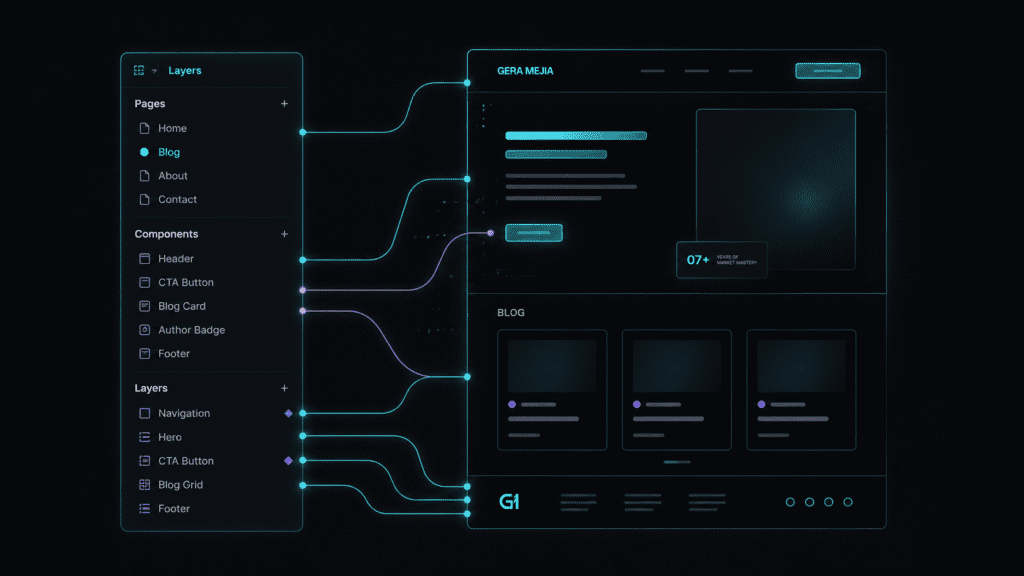
I want to be honest about why this step matters more than people think. Figma isn’t just “making it pretty.” It becomes the contract between what I want and what Claude Code produces downstream. If the Figma file is sloppy, the code output will be sloppy. I learned this the hard way (keep reading).
I spent roughly four hours here. Named every layer. Grouped components logically. Set up auto-layout where it mattered. At the time it felt tedious. Like I was being overly careful about something an AI was going to reinterpret anyway. I was wrong. The four hours I spent organizing Figma layers probably saved me six hours of debugging Claude Code’s output later.
Where it broke: I initially rushed the layer naming. Just… didn’t bother. “Frame 47” and “Group 12” everywhere. When Claude Code first parsed the file, it misinterpreted a hero section as a footer component because my Figma structure gave it nothing useful to work with. I went back, cleaned everything up with semantic names, and the second pass was dramatically better. This is the thing that convinced me the pipeline approach works — the quality of each handoff determines everything downstream.
Step 3 — Claude Code + Figma MCP: Where It Gets Real
This is the centerpiece of the whole pipeline. Claude Code with the Figma MCP (Model Context Protocol) server reads your Figma design file directly and generates working code from it.
I connected Claude Code to my Figma file via the MCP integration, then prompted it to generate a WordPress theme based on the design. Not a page builder template. Not blocks. An actual theme with PHP template files, CSS, and the functions.php wiring.
The first output was about 75% there. Layout matched. Typography was close. Most of the responsive behavior worked. But “75% there” in web development means “looks right until you actually click on something.”
I ran roughly 8 to 10 back-and-forth prompts refining the output. Specific stuff like: “The header spacing is off — check the Figma frame named ‘nav-desktop’ and match the padding.” Or: “The blog archive grid should be 3 columns on desktop, single column on mobile — it’s in the ‘blog-grid’ component.” Referencing specific Figma layer names in my prompts made corrections noticeably faster. When I was vague, Claude Code guessed. When I pointed it at a named layer, it got much closer.
Where it broke: Claude Code generated clean HTML and CSS but occasionally produced WordPress-incompatible PHP. Template hierarchy issues — it created a single.php that didn’t fall back correctly. A functions.php that enqueued styles using hardcoded paths instead of get_template_directory_uri(). The Figma MCP reads design beautifully but it doesn’t inherently know WordPress conventions the way a specialized WP tool would. This is the gap I had to bridge manually, and it’s where the ~200 lines of hand-written PHP came from.
This is also where I’d point you to the framework I use to decide if AI is the right call for a given task. Claude Code was absolutely the right call for translating a design into code. It was the wrong call for knowing WordPress-specific conventions. Knowing where that line is saved me from fighting the tool on things it was never going to get right on its own.
Step 4 — LocalWP: The “Does This Actually Work” Checkpoint
Every code change went straight into LocalWP for testing. It spins up a full WordPress environment on your machine in about 60 seconds. No server config. No FTP. Just drop your theme folder in and refresh.
This tight feedback loop was critical. I’d get code from Claude Code, drop it into the theme directory, refresh the local site, and see what worked. The whole cycle took maybe 30 seconds. Without this, I would’ve been deploying to a staging server every iteration, adding minutes to every cycle. That doesn’t sound like much until you realize I did this 40 or 50 times across the weekend.
I caught at least a dozen issues locally that would’ve been embarrassing live: a missing wp_head() call (which meant no admin bar and broken plugin output), a mobile menu toggle that only worked on the first click, a footer that straight up disappeared on archive pages.
Where it broke: LocalWP itself was solid. The friction was in manual file transfer — copying theme files from my Claude Code workspace into the LocalWP theme directory. There’s no native sync between Claude Code’s output and a LocalWP instance. Around Saturday at 11pm I got annoyed enough to write a quick shell script that watched my Claude Code output directory and auto-copied changes over. Took 15 minutes to set up and I should’ve done it immediately. This is a gap in the workflow that shouldn’t exist, and I talk more about it in the “unsolved” section below.
Step 5 — PHP: The Part AI Didn’t Solve Alone
This is where the “AI built my website” narrative falls apart if you’re being honest about it.
Claude Code generated roughly 80% of the PHP I needed. The remaining 20% required me to actually understand what was happening. Custom post type registration that needed specific query modifications. A dynamic breadcrumb function that choked on nested categories — it just rendered the top-level parent twice. Pagination that broke on the blog archive template because the main query and a secondary query were fighting each other.
These aren’t exotic requirements. They’re bread-and-butter WordPress development. But they required understanding WordPress’s template hierarchy and query system well enough to read what Claude Code produced and spot where it went wrong. I was debugging at like 2am Sunday morning and I’ll admit some of those fixes were more “brute force until it works” than “elegant solution.” They work though. I checked.
If you have zero PHP knowledge, this pipeline still gets you further than any page builder would. But you’ll hit a wall somewhere around that 80% mark. You’ll either need the skills to push through or someone you can call.
What I’d change: I should’ve front-loaded more WordPress-specific context in my Claude Code prompts. My initial prompt was basically “build a theme from this Figma file.” Way too open-ended. A better starting prompt would’ve been something like: “Build a WordPress theme following the standard template hierarchy, using theme.json for global styles, enqueueing stylesheets via wp_enqueue_scripts, with these Figma frames as the design reference.” The more WP-specific your instructions, the less cleanup afterward. I learned this by doing it wrong first.
Step 6 — OpenAI API: Consistent Post Images Without Canva
This wasn’t part of the original plan. But once the site was built, I needed blog post thumbnails and I really did not want to open Canva every time I published something. That’s the kind of micro-friction that quietly kills a content habit.
I wrote a simple script that calls the OpenAI image generation API with a consistent style prompt and the post title as input. Every thumbnail follows the same visual language — same color palette, same composition style — without me designing anything manually.
Total setup time: about 45 minutes. Cost per image: fractions of a cent. Consistency: honestly better than what I’d produce manually at 11pm trying to get a post out the door.
Where it broke: The first batch of prompts produced images with that unmistakable AI smoothness. You know the look. Everything’s slightly too clean, slightly too glossy, like a stock photo from a parallel universe. I spent time refining the prompt to produce something more textural — ended up specifying things like grain, muted color ranges, and asymmetric composition. Took about 15 iterations to land on a style I didn’t hate. The prompts are ugly and long and they work.
Step 7 — Deploy
Deployment was the least interesting step, which is exactly how deployment should feel. Zipped the theme, uploaded it to my WordPress host, activated it, ran through a quick QA checklist on my phone and laptop.
Total active build time across the 48-hour window: roughly 16 to 18 hours of actual work. The rest was sleeping, eating, walking around my apartment thinking about CSS grid, and one long stretch around Saturday evening where I just stared at my screen trying to figure out why a three-column layout kept collapsing to two columns. (It was a max-width I’d set on the container and forgotten about. Obviously.)
Was This the Easiest Path? No.
I’m not going to pretend this pipeline is for everyone. If you want a site live in four hours and don’t care about owning the code, there are faster options.
| Path | Best For | Trade-off |
|---|---|---|
| WordPress + Elementor/Divi | Non-technical users who need speed | Less control, page builder dependency, bloated code |
| Webflow | Design-first builders who want visual control | Higher monthly cost, no native WordPress back-end |
| Framer | Portfolio and design-heavy sites | Opinionated structure, no WordPress integration |
| WordPress Studio + Claude Code | WP-native builders who want official Automattic tooling | Newer tool, fewer community examples yet [VERIFY: WordPress Studio current feature set and Claude Code compatibility — confirm it supports local theme development similarly to LocalWP] |
My pipeline makes sense if you want full code ownership, a custom WordPress theme that isn’t a child theme or page builder layout, and the ability to modify everything later without vendor lock-in. If those things genuinely don’t matter to you, Webflow or Framer will get you live faster and with less frustration. That’s not a cop-out, it’s just true.
This Is a Pipeline, Not a Shortcut
The mistake I keep seeing people make with AI tools is treating each one as a standalone solution. “Can Claude Code build a website?” is the wrong question. That’s like asking if a table saw can build a house. Technically involved in the process, sure. But it’s not doing the job alone and it was never supposed to.
What actually matters is: what’s the pipeline, and where does each tool do its best work?
Stitch thinks. Figma specifies. Claude Code translates. LocalWP validates. PHP fixes. Each tool has a defined job, a defined input, and a defined output. When one tool’s output is clean, the next tool’s job gets easier. When it’s messy — like my “Frame 47” Figma layers — everything downstream suffers.
The 48-hour timeline wasn’t because any single tool was fast. It was because the handoffs between tools were tight. That’s where the speed actually lives. I keep telling people this and I think most of them don’t believe me until they try it.
What’s Still Unsolved
I want to be straight about the biggest gap: there’s no real-time sync between Claude Code and a WordPress environment.
Right now the workflow is: Claude Code generates code → I manually move files to LocalWP → I test → I go back to Claude Code with feedback. It works, but it’s clunky. Every file transfer is a context switch that breaks flow. That shell script I mentioned helped, but it’s duct tape. I want Claude Code writing directly into a WordPress theme directory with hot-reload. Something like what Cursor does for general development, but WordPress-aware. As MCP integrations mature, I think this gap probably closes within 6 to 12 months. But it’s not solved today, and pretending otherwise would be dishonest.
The other thing: Claude Code’s WordPress knowledge has real limits. It knows PHP. It knows HTML and CSS. But it doesn’t always know WordPress PHP — the hooks, the template hierarchy edge cases, the difference between get_posts() and a custom WP_Query and when each one will break your pagination. I had to be the WordPress expert in the loop. That’s fine for me. It’s a blocker for someone without that background, and I don’t think any amount of prompt engineering fully solves it yet.
What I’d Tell You
If you’re sitting where I was 48 hours before this site existed: the pipeline works. Stitch → Figma → Claude Code + Figma MCP → LocalWP → WordPress. I shipped a production site with it. But it rewards preparation — clean Figma files, specific prompts, enough WordPress knowledge to debug the output — and it punishes sloppiness at every handoff.
If you’re a growth marketer or freelancer building your own site, this approach gives you something no page builder does: a codebase you fully own, built to your exact design spec, with AI doing the translation work that used to take a week of back-and-forth with a developer.
I’ll be documenting more of these builds on my site, including the parts that break. Especially the parts that break, honestly, since those are the parts nobody else writes about.
What did you break trying this? I want to know. Find me on LinkedIn and tell me what went wrong — or what went better than my version.
FAQ
Can Claude Code build a WordPress site?
Yes, with caveats. Claude Code can generate a full WordPress theme — PHP templates, CSS, functions.php, theme.json — especially when paired with the Figma MCP for design reference. But it doesn’t produce 100% production-ready WordPress code out of the box. Expect to debug template hierarchy issues and WordPress-specific conventions manually. In my experience it gets you 75-80% there, and that last 20% is where you actually need to know what you’re doing.
What is the Figma MCP for Claude Code?
The Figma MCP (Model Context Protocol) is an integration that lets Claude Code read your Figma design files directly. Instead of describing your design in words, Claude Code can reference specific frames, layers, and components from your Figma file and generate code that matches. Clean layer naming and component structure in Figma directly improves the code output. I cannot stress this enough — my sloppy first attempt versus my cleaned-up Figma file produced dramatically different results from the exact same tool.
Is Google Stitch a website builder?
No. Google Stitch is an AI mockup generation tool — it produces UI layout concepts from text prompts. I used it purely for ideation: generating initial layout directions before moving to Figma for real design work. It’s a thinking tool. The outputs aren’t production-ready and aren’t meant to be. If someone is selling it to you as a website builder, they’re overselling it. [VERIFY: Google Stitch’s current product positioning and availability status]
How long does it take to build a website with Claude Code?
My build took 48 hours total (roughly 16-18 hours of active work) for a custom WordPress theme with blog, about page, service pages, and dynamic post thumbnails. Your timeline depends on design complexity, WordPress experience, and how clean your Figma file is. A simpler site with fewer templates could realistically ship in a single focused day. A more complex one could easily stretch to a week, especially if you’re learning WordPress conventions as you go.
LocalWP or WordPress Studio for Claude Code development?
I used LocalWP because it was mature and I trusted it. WordPress Studio is Automattic’s newer official local development tool, and Automattic has actually written about using WordPress Studio with Claude Code directly. Both give you a local WordPress environment for testing. Honestly the key factor isn’t which local tool you pick — it’s having any local environment that lets you test code changes in under 30 seconds. That feedback loop speed matters way more than the specific tool running it.
Sources & References
- Google Stitch — stitch.withgoogle.com
- Claude Code — docs.claude.com
- Figma MCP (Model Context Protocol) server — figma.com
- MCP integrations mature — armorcode.com